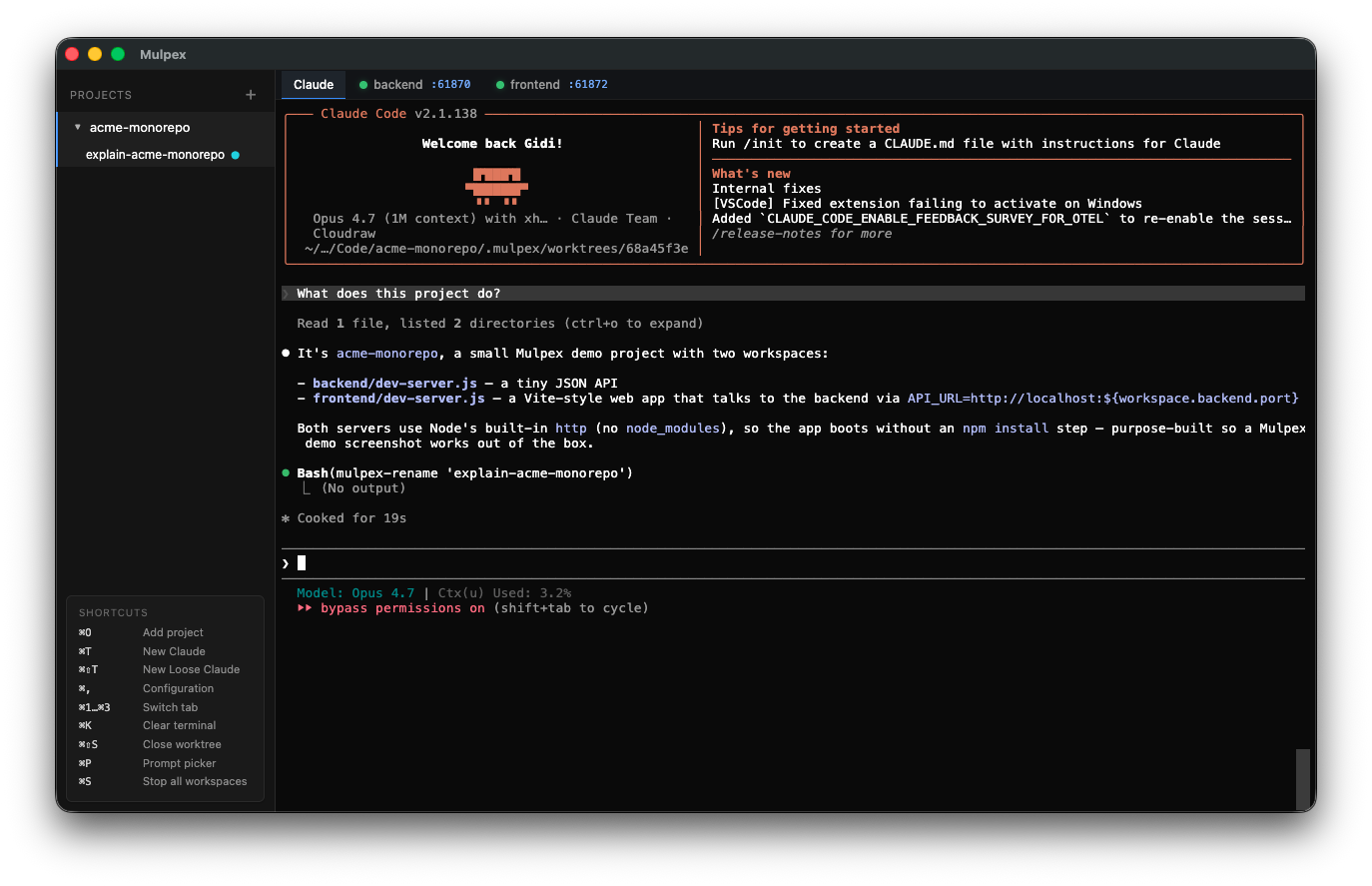
Worktree tabs, auto-named
Spawn a Claude session with ⌘T and Mulpex creates a fresh
git worktree on a dedicated branch. Tabs are titled with a 2–5 word
kebab-case label written by a separate Haiku call after your first
prompt — your real Claude session stays clean, your sidebar stays
readable.
Per-branch dev servers, auto-port
Declare workspaces in mulpex.json with
"PORT": "auto" and Mulpex hands each worktree its own
free port — sticky-cached per branch. Run localhost:3000
on one feature and localhost:3001 on another, in the
same browser, against the same project. Cross-workspace env
templating ($${workspace.backend.port}) wires
frontend and backend together automatically.
Pre-deploy review with Ask-Claude
Before you push, open the diff overlay (project right-click →
Pre-deploy review). Select any snippet and a pill button
opens an inline claude -p popup for a one-shot answer —
no full tab, no PTY. Discard lines, hunks, or whole files; stash,
reset, or revert commits without leaving the modal. The same overlay
drives a read-only Worktree review off any instance.
Built-in git panel
Toggle a right-side Sourcetree-style panel for the project's main
checkout: multi-lane history graph, working-copy stage/commit,
branch checkout/rename/delete/merge/rebase, tags, remotes, stashes.
When merge, rebase, cherry-pick, or stash-apply hits a conflict, a
banner offers Ask Claude to resolve — a transient
loose Claude resolves the conflicts and the tab auto-closes when
done.
One-button deploy
Pre-deploy review's footer gains a Deploy button
after a successful push. It spawns a fresh loose Claude bound to
your project's /deploy skill — a per-project deploy
procedure that Mulpex sets up and verifies on first run via a
dedicated worktree. Push, then deploy, both from inside the same
modal.
Loose tabs for the messy work
Not everything deserves a branch. ⌘⇧T spawns a
loose instance in the project's main checkout —
marked with ⚡ in the sidebar — for inspecting installed skills,
debugging a flaky port, or asking Claude about the codebase without
intending to commit. Promote to a worktree later in one click if it
turns into real work.
A terminal in every tab
⌘⌥T adds a full $SHELL -l -i tab inside the
instance, with the worktree as cwd — separate from the Claude pty,
so it survives session resets. Drag files in; cmd-click paths and
URLs to open them; ⌘K clears scrollback the way iTerm
does.
Runbooks for durable context
Project-local markdown notes you attach to sessions via
⌘P. Claude reads them as part of its system prompt and is
nudged to update them on merge — so recurring bugs and procedures
stay in scope across sessions. The picker auto-opens on fresh spawns;
a checkbox on the close dialog can distill the current session into a
new runbook.